Installation: Setting Up a Runner
There are two methods to set up a NodeZero Runner, each tailored to different user needs and technical preferences. Both methods enable you to automate and schedule internal penetration tests efficiently through the Horizon3.ai Portal.
-
Easy Install Script (Recommended)
This method uses a pre-generated script from the NodeZero Portal to automate the entire setup process with a single command. It’s ideal for users who want a quick, hassle-free setup with minimal manual intervention, especially in standard environments where default settings are sufficient.
-
Manual Setup with h3-cli
This method involves a hands-on approach, giving you full control over each step of the setup process. It’s best for advanced users who need to customize the configuration or troubleshoot specific network conditions.
Both methods allow you to leverage the Runner’s capabilities for automation, including scheduling recurring pentests and monitoring results directly from the Portal.
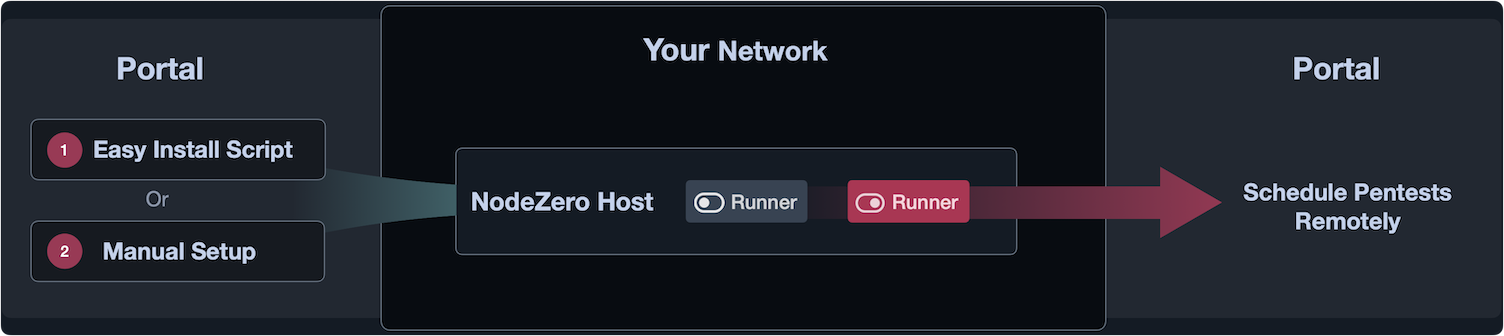
Figure 1 - Overview of the two activation methods: Easy Install Script and Manual Setup.
Choose a setup method
Select one of the methods below to set up your NodeZero Runner.