CrowdStrike Setup Guide
Stream NodeZero findings into CrowdStrike Falcon Next-Gen SIEM as security events, so that your SOC (Security Operations Center) can search, dashboard, correlate, and alert on proven exploitability alongside everything else Falcon already sees.
This article covers the setup end-to-end. Here's a preview of where you'll be working on the NodeZero Portal side:
Settings > Integrations > Add Integration > CrowdStrike Falcon Next-Gen SIEM
NodeZero orientation
See Using Integrations for background on NodeZero connectors, instances, datasets, workflows, and the controls common to every connector.
Contents
The Walkthrough
- Part A – Create the Connection in CrowdStrike
- Part B – Generate the API Key
- Part C – Connect the Instance in NodeZero
- Part D – Create the Workflow
- Part E – Verify End-to-End
Reference
- Datasets: What Gets Sent
- Operating the Integration
- Troubleshooting
- Frequently Asked Questions
- Appendix A – Event Field Reference
- Appendix B – Getting Started in NG-SIEM Search
What This Integration Does
NodeZero pushes findings into Falcon Next-Gen SIEM over CrowdStrike's HTTP Event Collector (HEC) ingest endpoint. On the Falcon side they arrive as events on a data connection, parsed by a Horizon3-authored parser, and are then available to NG-SIEM search, dashboards, correlation rules, and Charlotte AI like any other event source.
Direction: one-way, NodeZero > CrowdStrike. Nothing is read back out of Falcon. Transport: HTTPS push to a per-connection ingest URL. Trigger: automatic. NodeZero dispatches as new data arrives.
Before You Start
Confirm Falcon and NodeZero access, matching regions, and the two values you will copy from CrowdStrike into NodeZero.
In CrowdStrike
- A Falcon subscription that includes Next-Gen SIEM.
- Permission to create data connections: a role that can reach Next-Gen SIEM > Data onboarding > Data connections and use Add connection.
- Room in your NG-SIEM ingest allowance. NodeZero events count against your daily ingest volume, and the Data connections page shows your average ingest per day against your limit. Check it before turning on a high-volume dataset.
In NodeZero
- Access to Settings > Integrations for the account you want to connect.
- The CrowdStrike connector enabled for your account. If the CrowdStrike card isn't in the Add Integration picker, contact your Horizon3 representative.
A Note on Regions
CrowdStrike generates the API URL, and it already carries the region of the Falcon tenant you created the connection in. There is no region to choose in NodeZero.
Connect like-for-like regions. An EU NodeZero Portal should send to an EU Falcon cloud, a US NodeZero Portal to a US cloud. Nothing stops you crossing regions, so if your organization has data-residency obligations, confirm that you created the Falcon connection in the matching tenant before pasting its URL into NodeZero.
Two Values You Will Carry Between the Systems
The setup produces two strings in CrowdStrike and consumes them in NodeZero:
| Value | Created In | Used In | Notes |
|---|---|---|---|
| API URL | CrowdStrike | NodeZero > Instance URL | Unique per connection. Ends in /services/collector |
| API key | CrowdStrike | NodeZero > HEC token | Shown once, at creation. Copy it before closing the dialog |
Do this part in one sitting
The API key is displayed exactly once. If you close the dialog without copying it, you must generate a new key.
How the Two Sides Fit Together
  CROWDSTRIKE                                    NODEZERO
  ───────────                                    ────────
  Data connection            ──  API URL  ──▶    Instance  ▸  Instance URL
  (NodeZero 1)               ──  API key  ──▶    (Develop - US)  ▸  HEC token
        ▲                                              │
        │                                              ▼
        └────────── events ──────────────────  Workflow (Pentest Data > Develop - US)
One CrowdStrike data connection pairs with one NodeZero instance. Two Falcon tenants, or a dev tenant alongside production, means two connections and two instances.
Start in CrowdStrike. The values NodeZero needs do not exist until the CrowdStrike connection has been created.
Part A – Create the Connection in CrowdStrike
Create the Falcon data connection, including the parser and host-enrichment settings NodeZero will push to.
Open the Data Connector Catalog
- In the Falcon console, go to Next-Gen SIEM > Data onboarding > Data connections.
- Select Add connection.
You land on Data connectors, a catalog of several hundred connectors.
Find the NodeZero Connector
In Filter by connector name, type nodezero.
Select Horizon3 NodeZero Pentests Data Connector. Confirm that the row shows:
| Field | Value |
|---|---|
| Vendor | Horizon3 |
| Product | Horizon3 NodeZero Pentests |
| Connector type | Push |
| Author | Horizon3 |
| Subscriptions | Next-Gen SIEM |
| Data types | Events |
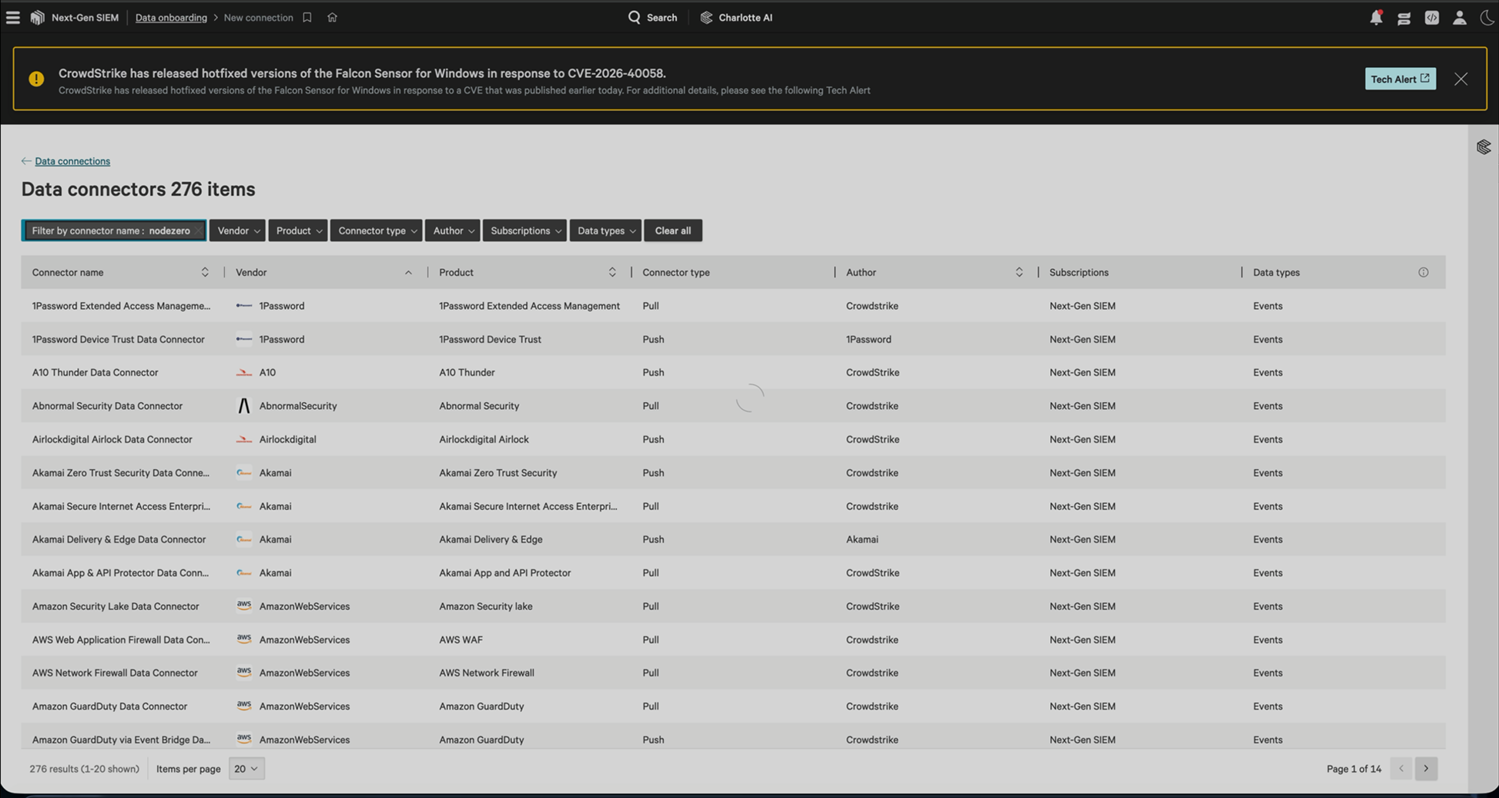
The Data connectors catalog, before filtering to find the NodeZero connector
Push means NodeZero initiates
CrowdStrike receives. You do not give CrowdStrike any NodeZero credentials, open inbound firewall rules, or install a collector.
Fill in New Connection Details
The connector name, vendor, and connector author are fixed. You set the rest:
| Field | Guidance |
|---|---|
| Connection name | Required. Identifies the connection in Falcon. Match it to the instance label you will use in NodeZero – see the naming note below |
| Description | Optional. Record what the connection carries and who owns it, such as "NodeZero pentest findings, Production, owned by SecOps" |
| Data timezone | Leave at UTC +00:00. It applies only to incoming data that carries no timezone of its own, and NodeZero events carry their own timestamps. Changing it introduces skew |
Parsing and Enrichment
Leave these parser and enrichment controls at the defaults unless instructed otherwise:
| Control | Recommended | Why |
|---|---|---|
| Parsers | Leave as horizon3-nodezero-pentests |
The Horizon3-authored parser that maps NodeZero events onto CrowdStrike's field standard. Selected automatically and locked unless you select Enable parser selection |
| Enable parser selection | Leave unchecked | Select it only if you have been instructed to point at a different parser. Events sent through the wrong parser still ingest, and still cost you ingest volume, but arrive unsearchable and unusable in dashboards |
| Enable host enrichment | Leave checked (the default) | Associates incoming events with hosts Falcon already knows, joining NodeZero findings to managed endpoints. Without it you cannot ask which proven-exploitable hosts carry a sensor |
Select the affirmation that data shared with CrowdStrike is shared in accordance with the Terms and Conditions, then select Create connection.
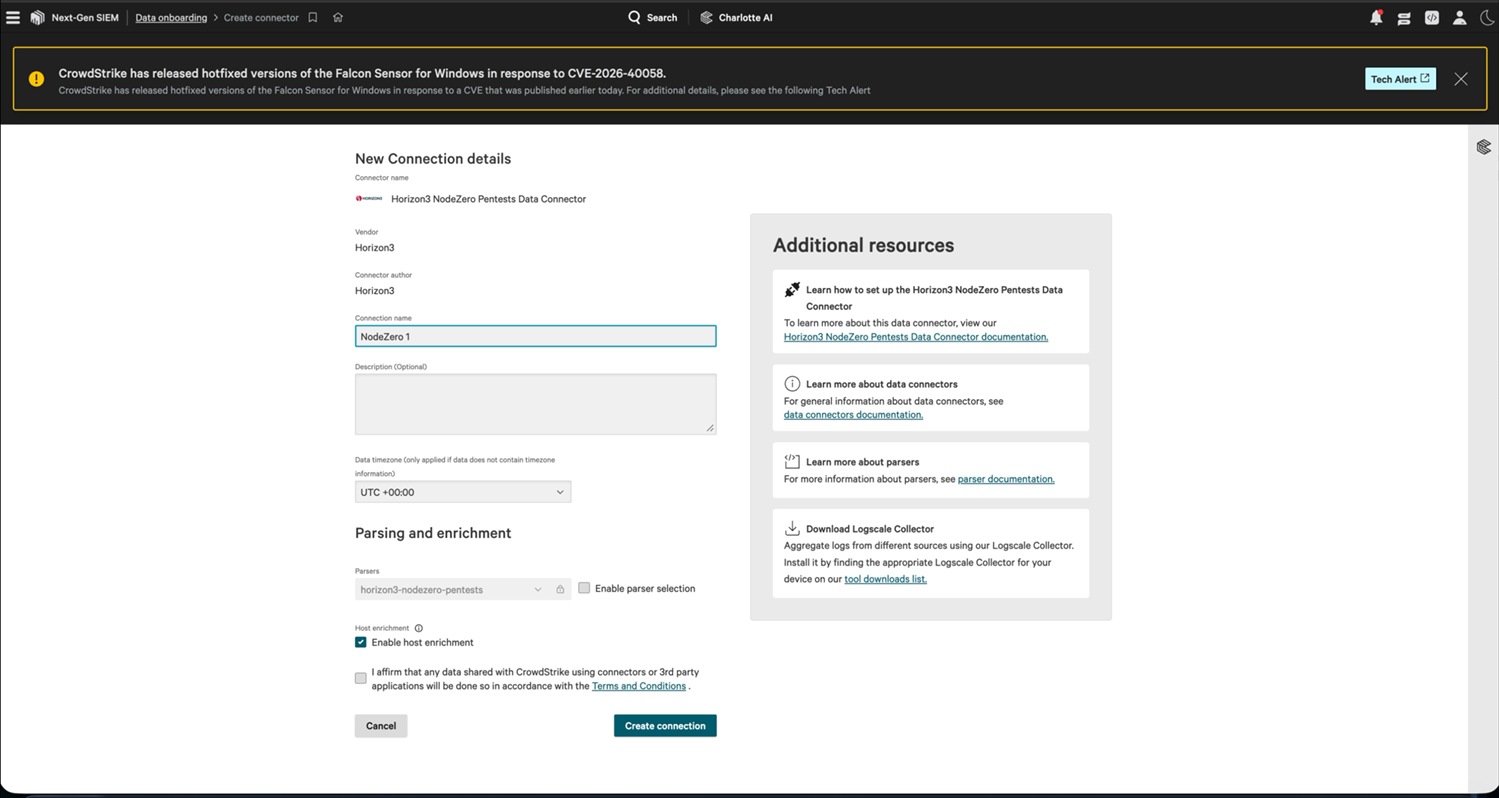
New connection details
Name both sides the same
If the Falcon connection is NodeZero – Production, label the NodeZero instance NodeZero – Production too. Chasing a missing event means moving between two consoles, and matching names enable you to confirm that you are looking at the same pair.
The Connection Is Created and Pending
Falcon opens the connection's detail page:
| Field | Note |
|---|---|
| Connection Name / Connection ID | The ID appears inside the API URL |
| Vendor / Product / Connector Author | Horizon3 |
| Configuration Type | standard |
| Parser | horizon3-nodezero-pentests, as a link to the parser |
| API URL | https://<connection-id>.ingest.<region>.crowdstrike.com/services/collector |
| Host Enrichment | Enabled |
| Connection Status | Pending |
| Total Ingest (Last 24 hours) | 0 B |
| Execution history | Last 72 hours, filterable by status. Empty for now |
Pending is correct at this stage. The connection exists and is ready but has never received data. It stays Pending until the first event arrives.
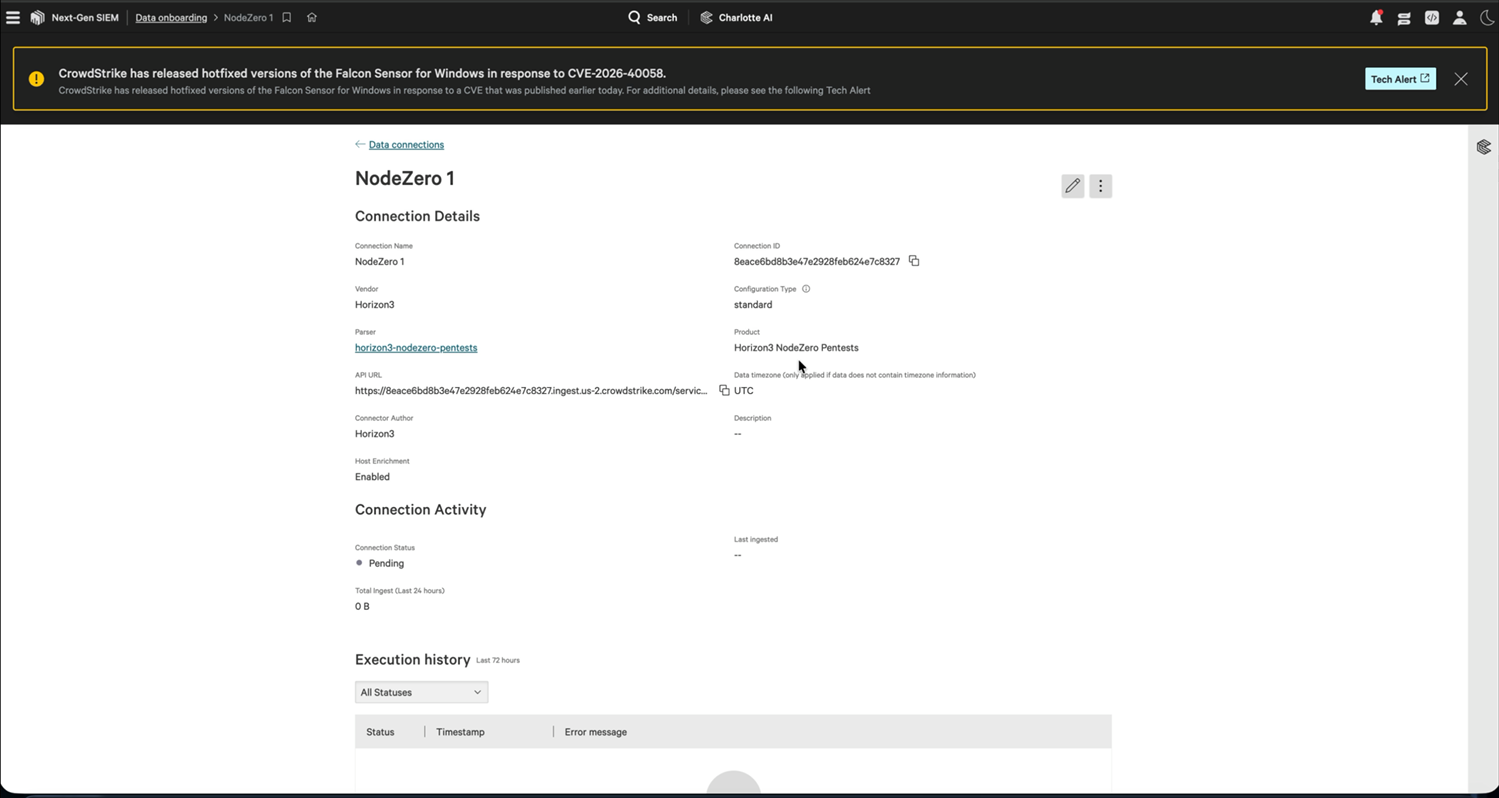
A new connection, still pending
Part B – Generate the API Key
A banner sits at the top of the connection page:
This connector is ready to receive data. To begin sending data, select the Generate API key button and enter it into Horizon3 or an appropriate service.
- Select Generate API key.
- The Connection setup dialog appears with three values:
- CID name – your Falcon CID (customer ID) tenant name.
- API key – the secret.
- API URL – the ingest endpoint.
Each of the latter two has a copy icon.
The API Key Is Shown Once
This API key will only be shown once.
Copy both the API key and the API URL now, into your password manager or straight into the NodeZero form in another tab. Closing this dialog without the key means generating a new one, which invalidates the old key and requires updating NodeZero.
- Copy the API key and the API URL.
- Select Close.
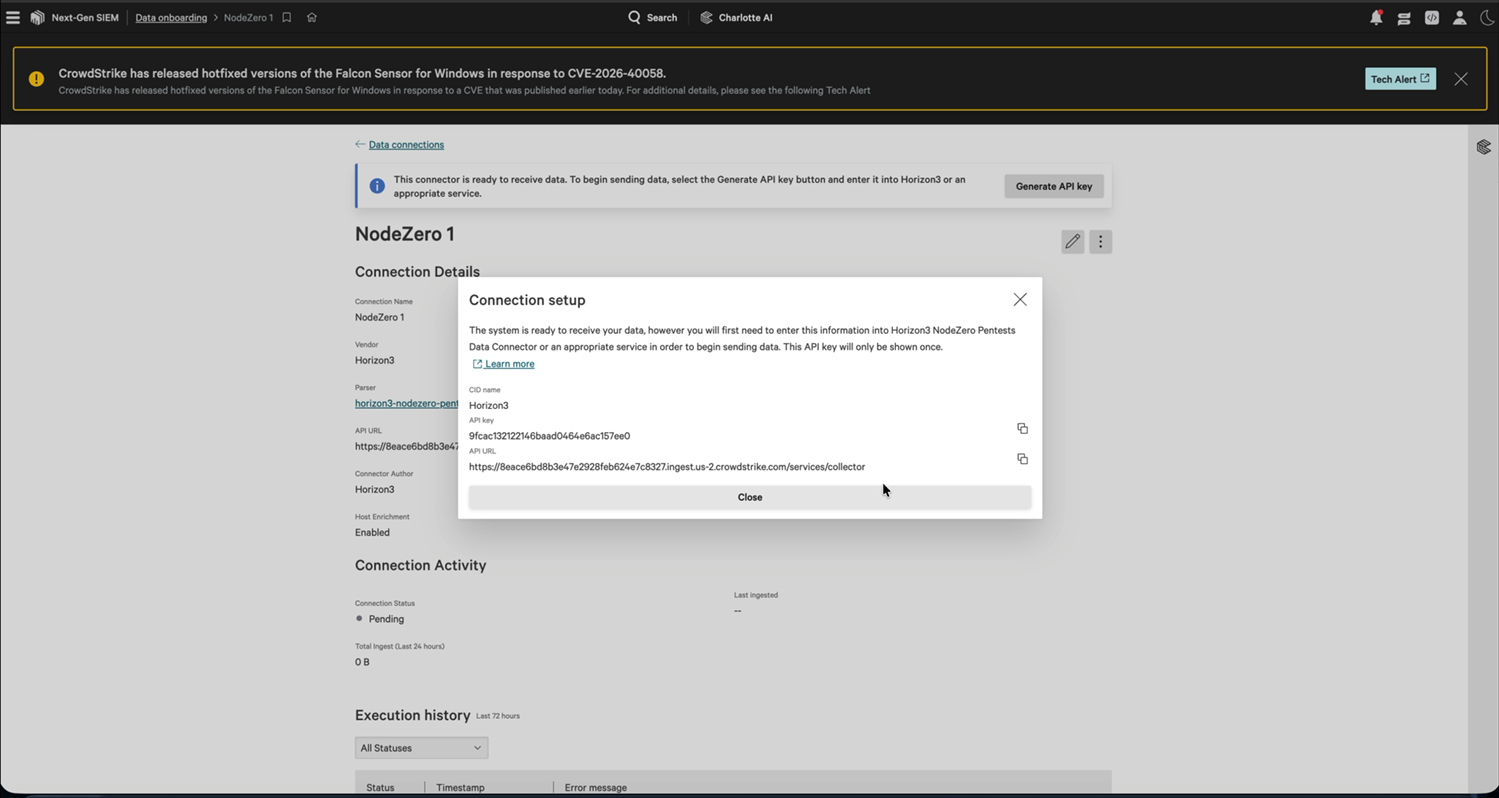
The API key, shown only once
Sanity-Check the API URL
Before you leave CrowdStrike, confirm that the URL looks like this:
https://8eace6bd8b3e47e2928feb624e7c8327.ingest.us-2.crowdstrike.com/services/collector
        └──────── connection ID ────────┘        └─ region ─┘            └─ required path ─┘
Three things to check:
- It ends in
/services/collector. NodeZero validates this and rejects a URL without it. - The region matches your Falcon cloud, such as
us-1,us-2, oreu-1. CrowdStrike generates it correctly; the risk is pasting a URL kept from another tenant. - The connection ID matches the Connection ID on the connection detail page, confirming that you copied the URL for the connection you just made.
Part C – Connect the Instance in NodeZero
Add the CrowdStrike connector in NodeZero and verify the instance with the API URL and key.
Start the Wizard
- In NodeZero, go to Settings > Integrations.
- Confirm that the account switcher in the top right shows the right account.
- On the Connected Integrations tab, select Add Integration.
Choose the Connector
In Choose a connector, select the CrowdStrike card. Its chips show the datasets this connector accepts: Pentest Data and Tripwires.
Select Next.
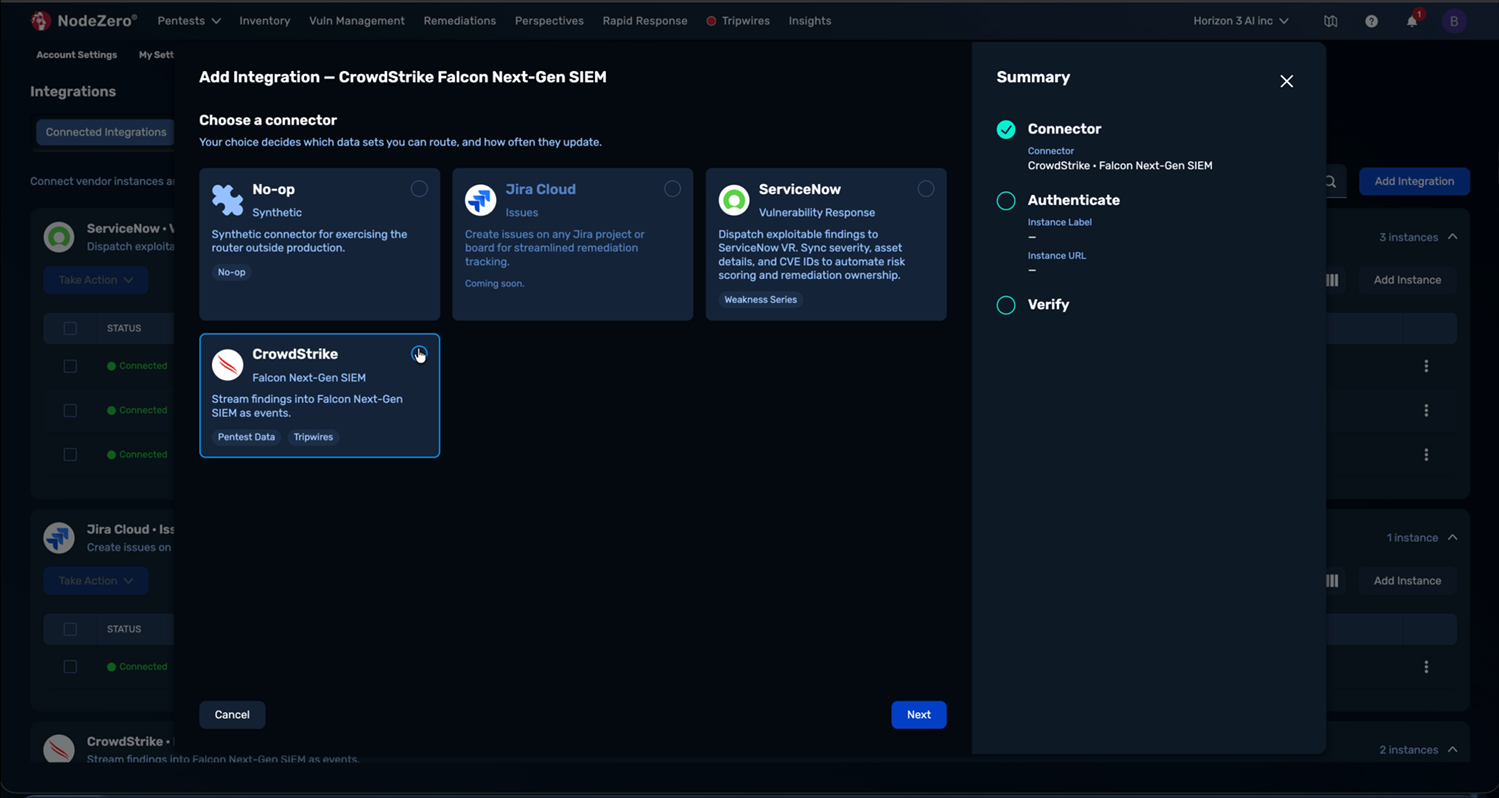
Selecting the CrowdStrike connector
Enter the Instance Details
Three fields are required here. The Summary panel on the right fills in as you type, so you can confirm the endpoint before submitting.
| Field | What to Enter |
|---|---|
| Instance label | Your name for this Falcon tenant. Match the CrowdStrike connection name. Examples: Develop - US, Falcon US-2 – Production, Manufacturing BU – Production |
| Instance URL | The API URL you copied from CrowdStrike. Paste the whole thing, including /services/collector |
| HEC token | The API key you copied from CrowdStrike. Masked as you type; the eye icon reveals it before you submit |
Common paste errors, all of which cause the same generic failure:
- The URL is missing the trailing
/services/collector. - Leading or trailing whitespace on the token, picked up from a copy.
- A truncated token, from a partial selection rather than the copy icon.
- The URL from one connection paired with the API key from another.
Select Verify Authentication.
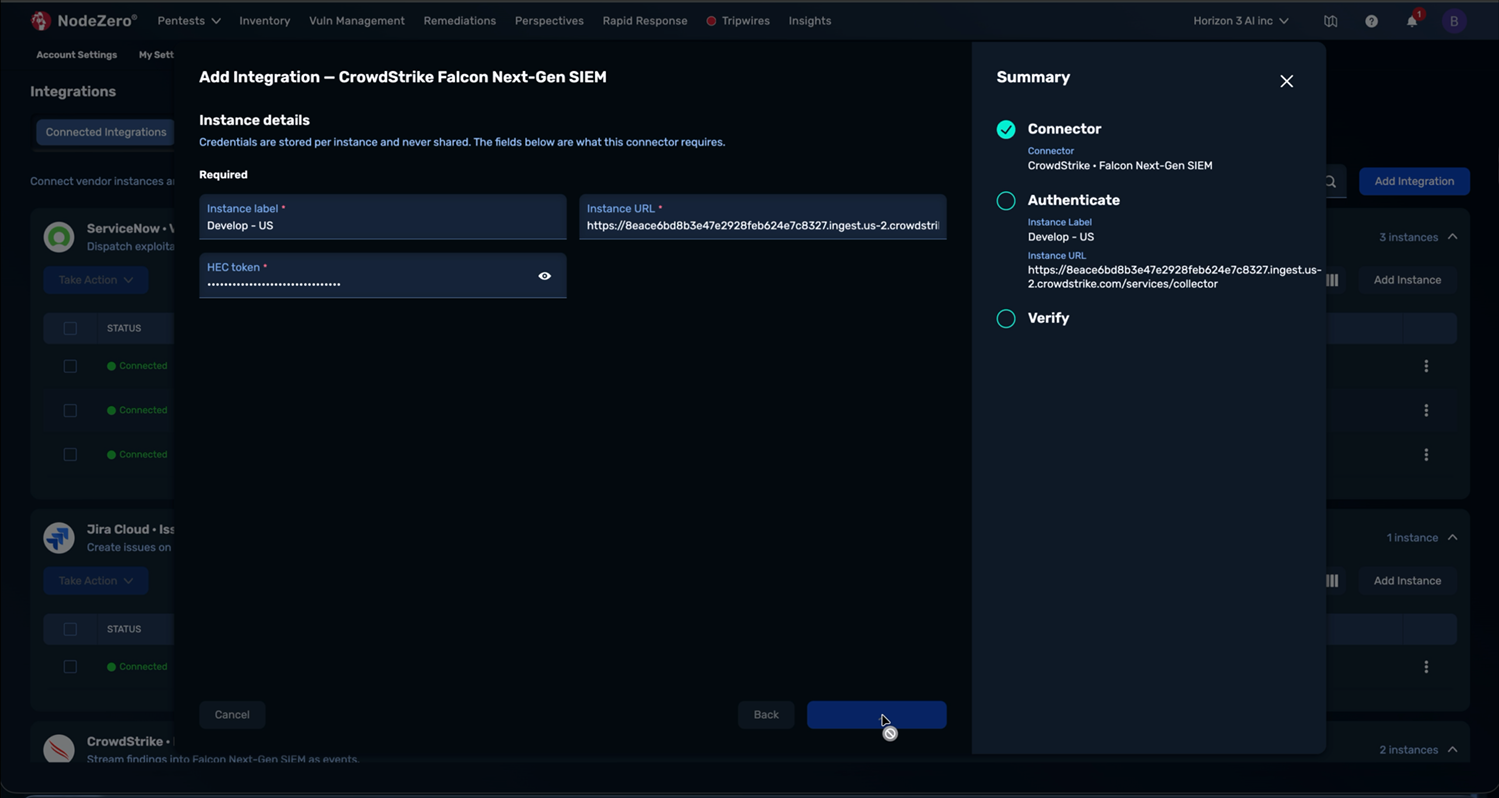
Instance details filled in for a CrowdStrike connector
Verification Checks
NodeZero runs two checks at this point:
- Endpoint format. The URL is well-formed and carries the required collector path.
- Authentication. The endpoint accepts the token.
No event is sent to CrowdStrike at this stage. Passing this step puts nothing in your SIEM (Security Information and Event Management) and leaves the connection at Pending. The on-demand check available later through Verify Now ingests a single synthetic test event; see What the Test Event Looks Like.
Connected and Verified
On success:
✓ Connected and verified.
Develop - US won't receive anything until a workflow names it as a destination.
The Summary panel shows Connector, Instance Label, Instance URL, Authentication Passed and Health Verified, and two toasts confirm that the instance is connected and healthy.
The credential works, but no data flows yet. Creating the workflow in Part D is what starts it.
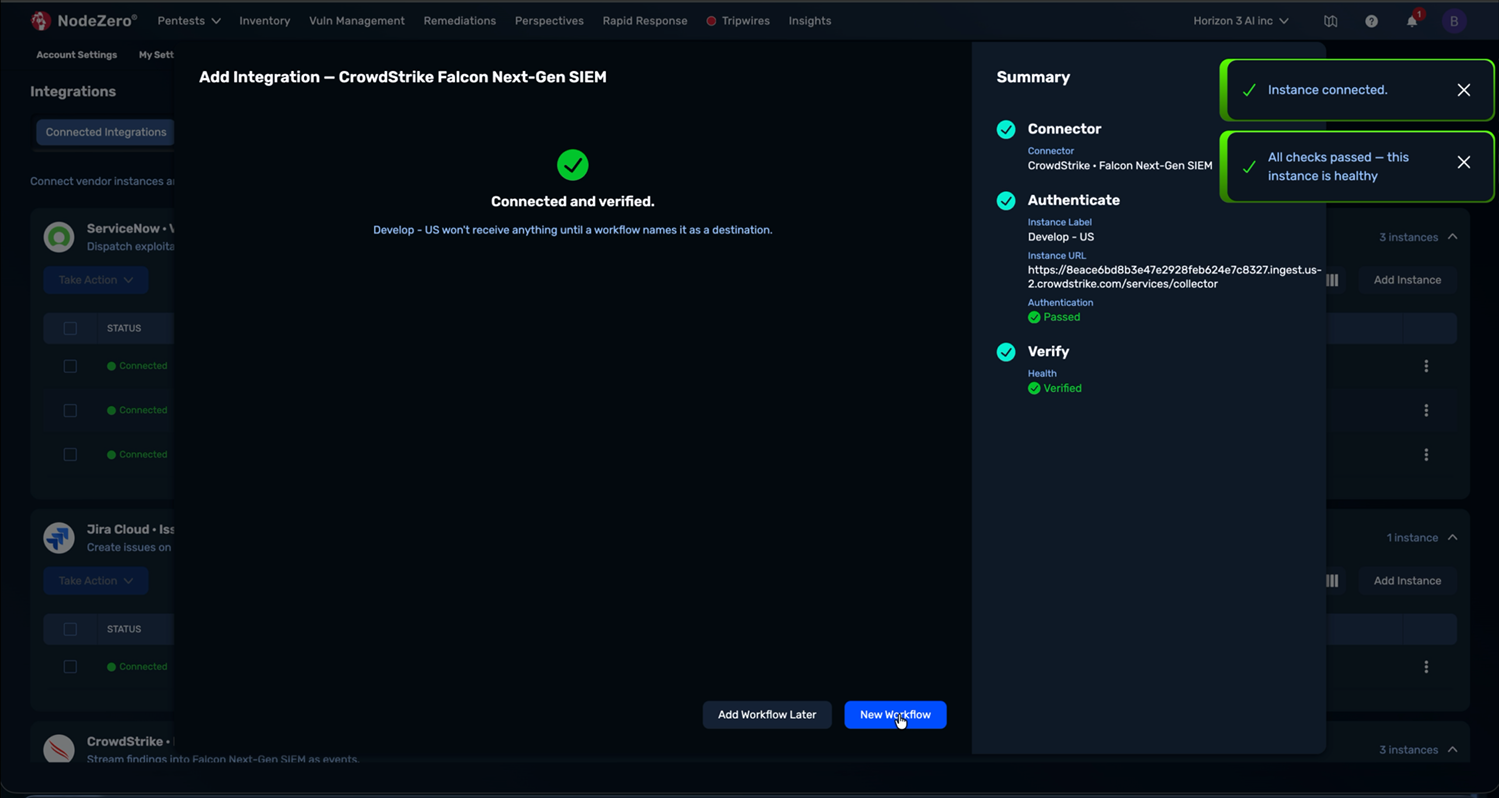
Success: a connected and verified integration
Select New Workflow to continue. (Add Workflow Later finishes here and leaves the instance
with No workflows on the Connected Integrations tab.)
Part D – Create the Workflow
The workflow is the rule that sends data.
| Field | What to Set |
|---|---|
| Destination | CrowdStrike Falcon Next-Gen SIEM – <your instance label>. Prefilled if you came from the wizard |
| Dataset | Pentest Data or Tripwires. One per workflow; see below |
| Sync | Not editable. CrowdStrike NG-SIEM supports Automatic dispatch only. Dispatches on its own, as new data arrives |
| Activate this workflow | Leave checked. Unchecked saves the rule dormant, and nothing dispatches until you turn it on |
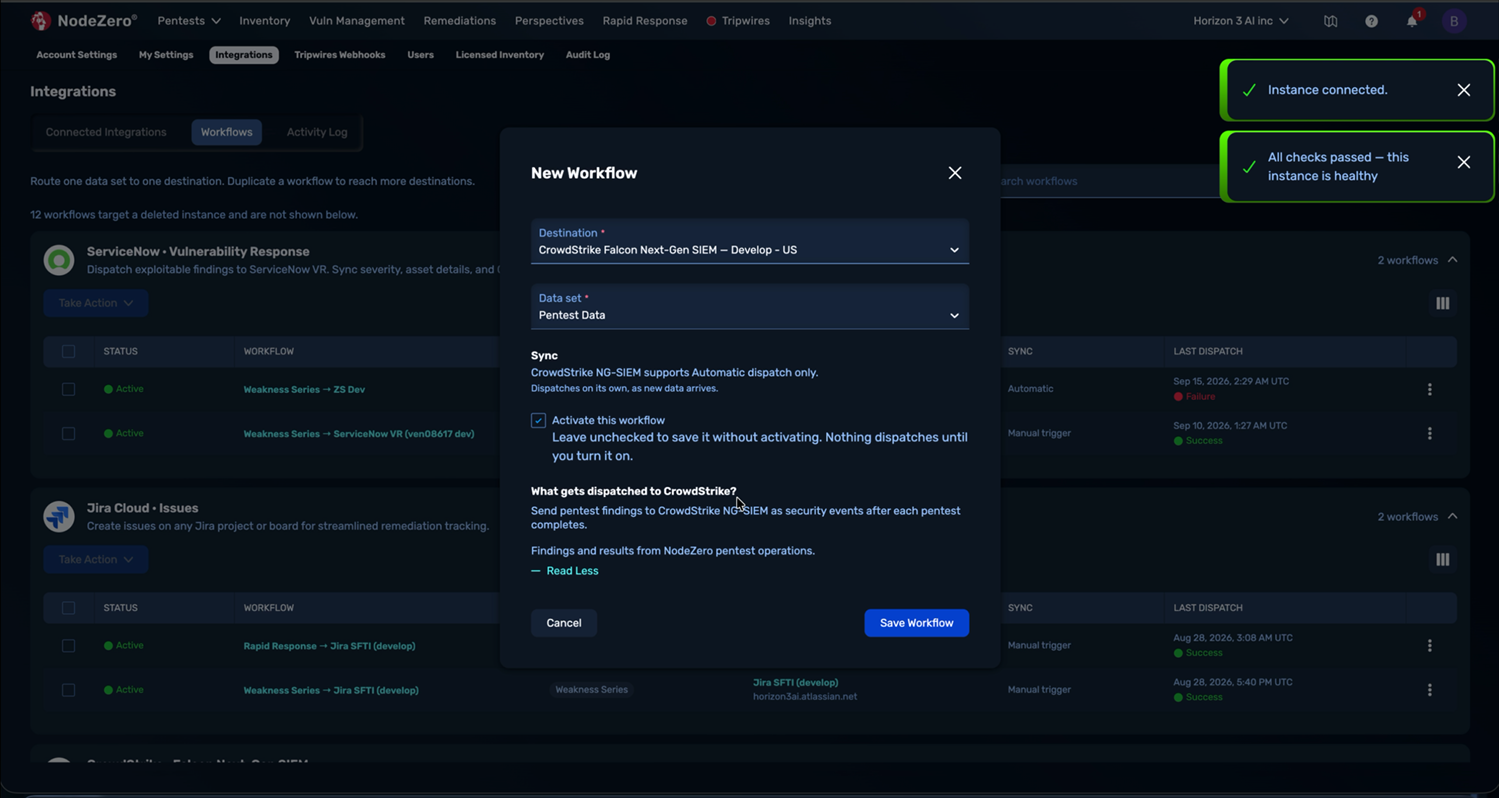
Creating a Workflow
Expand What gets dispatched to CrowdStrike? for a description of the selected dataset. For Pentest Data:
Send pentest findings to CrowdStrike NG-SIEM as security events after each pentest completes. Findings and results from NodeZero pentest operations.
Select Save Workflow. You'll see Workflow saved and activated, and the workflow appears
under the CrowdStrike card as Pentest Data > Develop - US, Status Active, Sync Automatic,
Last Dispatch –.
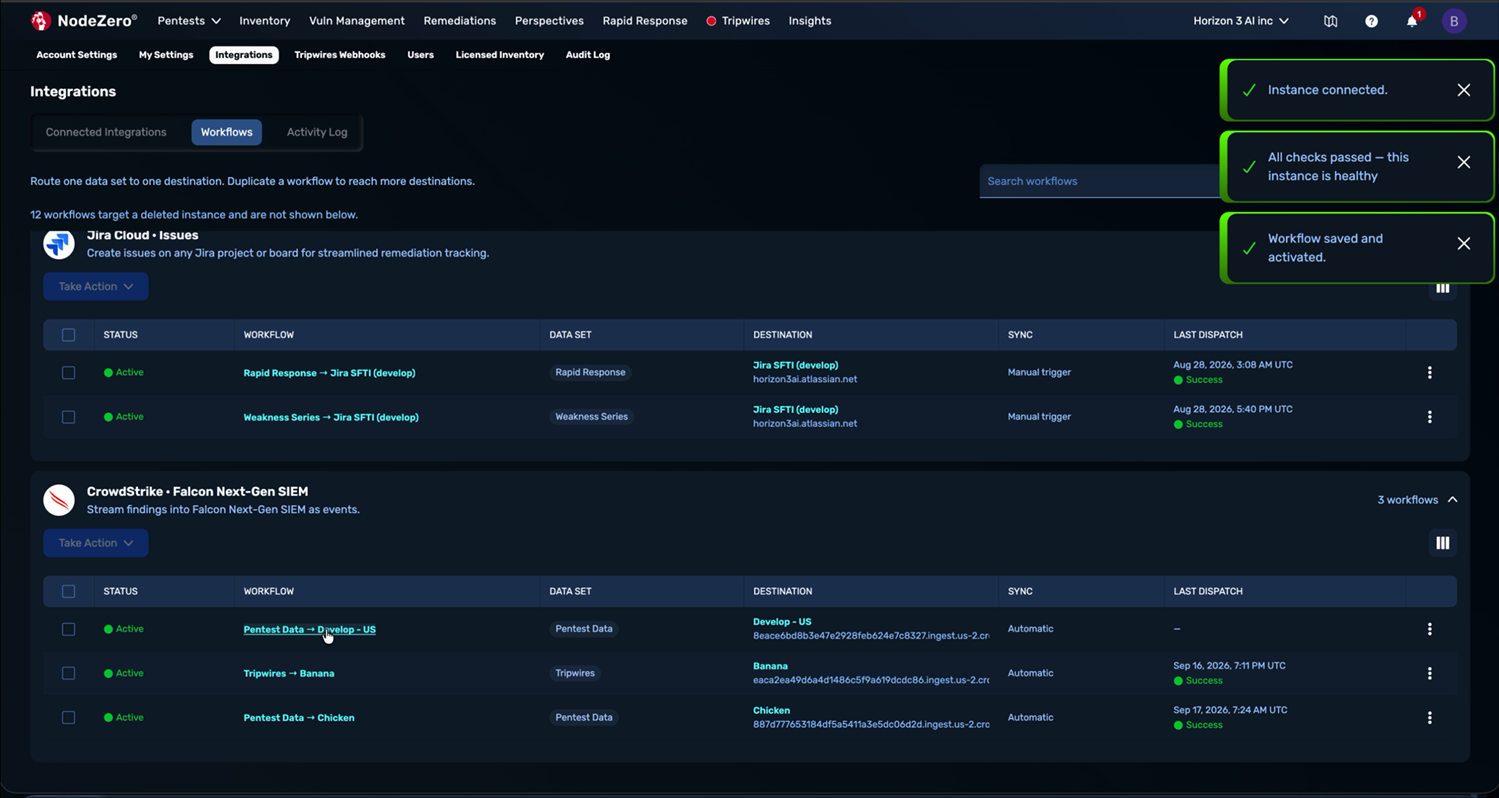
Confirmation that the Workflow is saved
Sending Both Datasets
A workflow carries exactly one dataset. Sending both Pentest Data and Tripwires to the same Falcon tenant takes two workflows: use ⋮ > Duplicate on the first, then change the dataset on the copy.
Sending to Two Falcon Tenants
The same pattern one level up. A second CrowdStrike connection, a second NodeZero instance, and a duplicated workflow pointed at the new destination.
Part E – Verify End-to-End
Verification passed and the workflow is Active, but nothing has been sent yet: Automatic dispatch waits for qualifying data.
Produce Some Data
Run an assessment from Pentests > Run Assessment, or wait for a scheduled one. Pentest Data dispatches after a pentest completes. Tripwires dispatch when a tripwire fires.
Expect a gap
Processing on the NodeZero side and indexing on the CrowdStrike side sit between the pentest finishing and events appearing in NG-SIEM. Allow a few minutes.
Don't want to wait for a pentest?
Run ⋮ > Verify Now on the instance. Its on-demand check emits a single synthetic probe event into your Falcon connection, which proves the transport end-to-end in seconds. See What the Test Event Looks Like for how to find and exclude it.
Check the NodeZero Side
Settings > Integrations > Activity Log. You want a row with:
- Connector: CrowdStrike Falcon Next-Gen SIEM.
- Dataset: Pentest Data.
- Destination: your instance label.
- Records: a non-zero count.
- Status: Success.
Select View to open the dispatch's own page, which carries the summary, the Delivery destination, and a Dispatch Log table (Created / Type / Message) breaking down what happened in that run. That page has its own URL, so you can paste it into a ticket.
On Connected Integrations, the instance's Last Dispatch should now show a timestamp with
a green Success in place of the –.
Check the CrowdStrike Side
Back in Next-Gen SIEM > Data onboarding > Data connections, find your connection in the Connections table. Two things should have changed:
| Field | Before | After |
|---|---|---|
| Status | Pending | Active (or Idle, if the last send was a while ago) |
| Ingest (24h) | 0 B |
A non-zero volume |
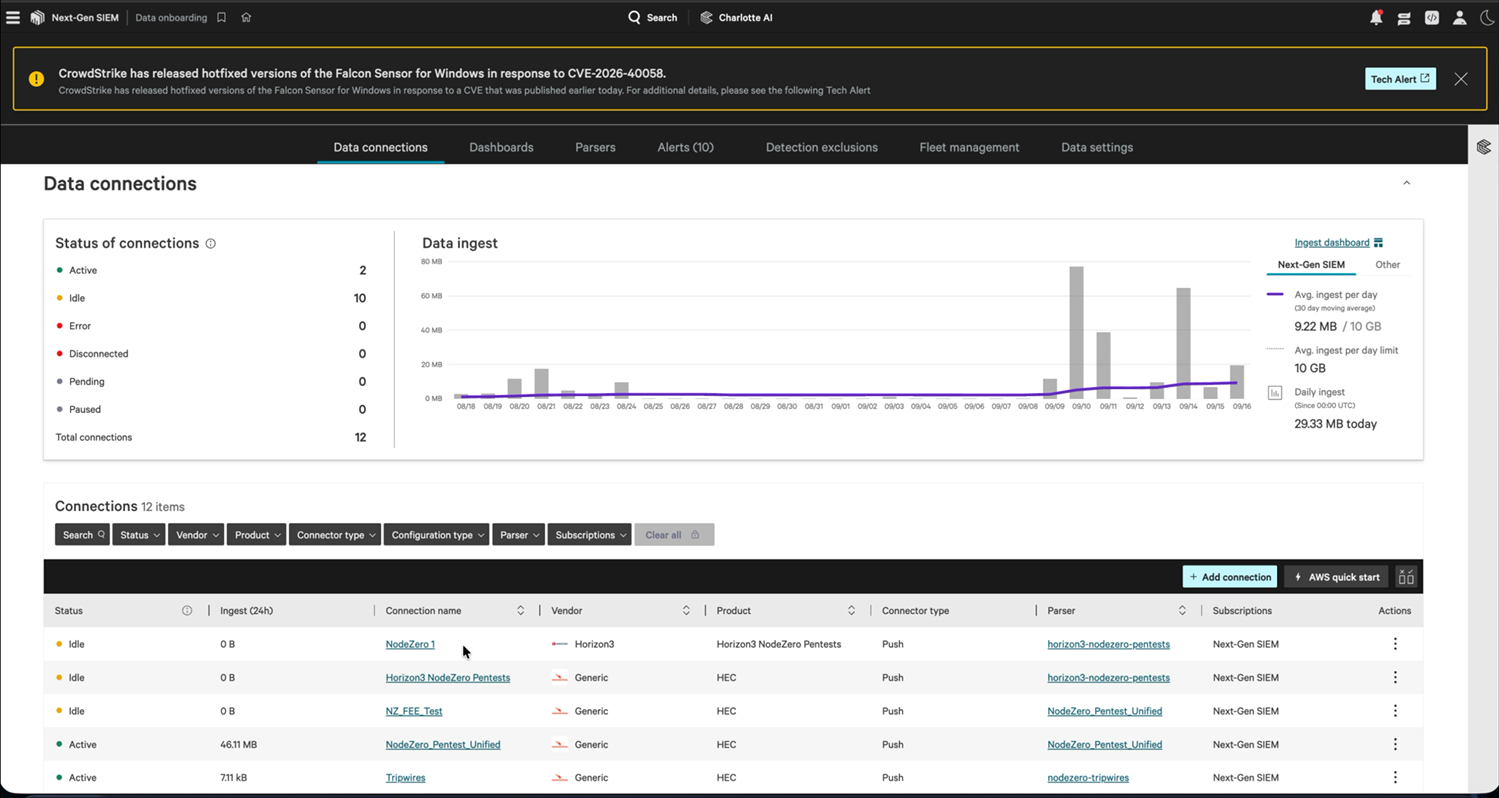
Data connections overview
On the connection's detail page, Last ingested now carries a timestamp, and Execution history shows entries.
Understanding the CrowdStrike Connection Statuses
Falcon shows one of these statuses on the connection:
| Status | Meaning |
|---|---|
| Pending | Created, never received data. Normal before the first dispatch |
| Active | Receiving data now, or very recently |
| Idle | Has received data before, but nothing recently. The normal resting state for a NodeZero connection between pentests |
| Error | CrowdStrike rejected recent data. Check Execution history for the message |
| Disconnected / Paused | The connection is not currently accepting data |
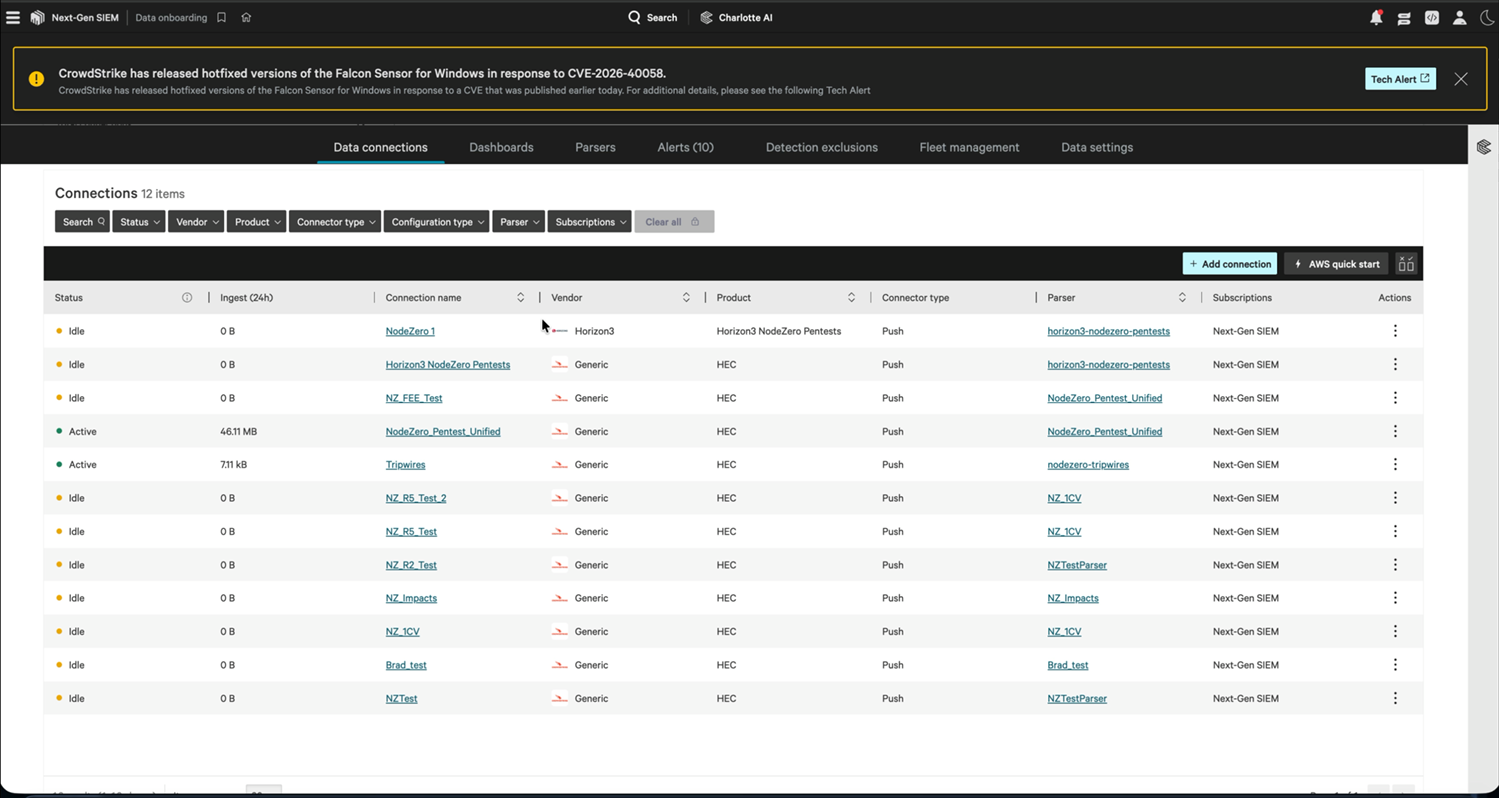
Connection statuses, with ingest counts
Idle does not mean broken
NodeZero sends in bursts after pentests rather than continuously, so a connection sits Idle between them. Judge health by Last ingested and by NodeZero's Activity Log rather than by the Active/Idle badge.
Search for the Events
In NG-SIEM search, query the connection you just created, and confirm that the events are parsed: named fields with values in them rather than raw text. Unparsed events point at the parser selection; see Troubleshooting.
Datasets: What Gets Sent
This connector can send the following datasets:
| Dataset | Contains | Dispatched when |
|---|---|---|
| Pentest Data | Findings and results from NodeZero pentest operations: the weaknesses proven during the pentest and the impacts achieved. Also carries re-verification verdicts, produced when you re-run verification against previously found issues | After each pentest completes |
| Tripwires | Tripwire events | When a tripwire fires |
Re-verification verdicts are conditional
They appear in Pentest Data only after a verification run against earlier findings, so not every pentest produces them. They are what lets a Falcon dashboard report whether a fix held, rather than only what is broken.
What This Gives Your SOC
The distinguishing property of this data is not that it is another vulnerability feed. It is that every finding carries proof – NodeZero reached it, exploited it, and recorded what that achieved. In Falcon that supports questions a scanner feed cannot answer:
- Which exploitable hosts have no Falcon sensor on them?
- Which proven-exploitable weaknesses sit on hosts that are also generating detections?
- Did a shipped fix close the path, according to re-verification?
Scope and Filtering
The workflow carries no user-configurable filters or transforms. Each dataset has a defined scope, and dispatches are incremental: NodeZero sends what is new rather than resending the whole history. Narrow what reaches your analysts in Falcon, with search, dashboards, and correlation rules.
Volume Planning
NodeZero volume arrives in bursts, and tracks pentest cadence and estate size rather than a steady events-per-second rate. Before enabling this on a tenant near its ingest ceiling:
- Check Avg ingest per day against your limit on the Data connections page.
- Turn on one dataset first, run one pentest, and read the resulting Ingest (24h) figure.
- Scale that against your assessment cadence.
Operating the Integration
Rotate the ingest key, pause traffic, check health on demand, and retry failed dispatches without losing history.
Rotating the CrowdStrike API Key
When the key is rotated or revoked on the CrowdStrike side:
- In CrowdStrike, open the connection and Generate API key. Copy the new key; it is shown once, as before.
- In NodeZero, on the CrowdStrike instance row: ⋮ > Edit Instance. Paste the new key into the HEC token field and save.
Edit Instance is where secrets are replaced; there is no separate rotate action. The stored
token is never shown back to you, and the field reads Leave blank to keep the stored credential: leave it empty to change only the label or endpoint, or type a value to replace the
secret.
Regenerating a key does not change the API URL.
Do not delete and recreate the NodeZero instance. Deleting removes its workflows and their dispatch history permanently. Editing in place preserves the instance, its label, and every workflow.
Saving the edit re-verifies the instance. A wrong key sends it straight to Action needed with the reason printed in the row. Verify Now stays available in the row menu for a full health check.
Pausing the Flow
To stop sending during a Falcon maintenance window, an ingest-budget squeeze, or a noisy period, deactivate in NodeZero. Either select the workflow rows and use Take Action > Deactivate, or deactivate the whole instance (⋮ > Deactivate) to pause every workflow that targets it at once. Both are reversible and preserve history.
Deleting the CrowdStrike connection invalidates its API URL and key permanently, which means rebuilding both sides. Deactivate instead.
Checking Health on Demand
⋮ > Verify Now on the instance re-runs the connector's checks, including one that ingests a single synthetic test event into your Falcon connection. That event is real ingest: it lands in your tenant, appears in the connection's history and counts toward your volume. Run it before a large scheduled pentest, rather than on a loop.
What the Test Event Looks Like
The probe is a single record, marked so that you can recognize and exclude it:
{
  "WeaknessID": "H3-CONNECTION-TEST",
  "Name": "NodeZero -> CrowdStrike NG-SIEM connectivity probe",
  "Severity": "LOW",
  "created_at": "2026-09-18T06:29:25.097176+00:00",
  "Description": "Synthetic event emitted by the NodeZero integration to verify transport."
}
H3-CONNECTION-TEST is the marker. It is a fixed literal that does not vary per tenant, instance, or run, so exclusions can safely key on it.
- Exclude it from dashboards and correlation rules. At
LOWseverity it will not trigger critical-severity rules, but it does appear in "all NodeZero findings" counts and inflates them by one per verification. Filter it out at the panel or rule level. - Use it as transport proof. It is the only NodeZero event you can produce on demand, so searching for
H3-CONNECTION-TESTafter a Verify Now confirms the path without waiting for a pentest.
It carries no finding data: no host, no CVE, no proof.
Retrying a Failed Dispatch
From the Activity Log, open the failed dispatch and select Retry. Dispatches carry an idempotency key, so a retry cannot duplicate records already delivered to Falcon. See Integrations for the full retry behavior.
Troubleshooting
Work setup failures first, then a nothing-arriving checklist, then other post-setup symptoms.
Setup-Time Failures
These failures show up while you are connecting the instance:
| Symptom | Cause | Fix |
|---|---|---|
| Verify Authentication fails immediately | URL missing /services/collector |
Re-copy the full API URL from the CrowdStrike connection page |
| Verification fails, URL looks right | Token wrong, truncated, or has whitespace | NodeZero reports HEC rejected the token. Check the token is current and enabled for this connector. Use the copy icon in the CrowdStrike dialog rather than selecting the text. If the key was never copied, generate a new one |
| Verification fails, both values look right | URL and key are from different connections | Confirm that the connection ID inside the API URL matches the Connection ID on the page the key came from |
| Verification fails after a previous key regeneration | The old key was invalidated | ⋮ > Edit Instance and paste the current key |
| CrowdStrike card missing from the connector picker | Connector not enabled for your account | Contact your Horizon3 representative |
| API key dialog closed before copying | The key is unrecoverable by design | Generate API key again and use the new one |
Post-Setup: Nothing Arriving
Work down this list in order.
| Check | Where | What You Want to See |
|---|---|---|
| 1. Is there a workflow at all? | Connected Integrations > instance row | The Workflows column is not No workflows |
| 2. Is it Active? | Workflows tab | Status Active, not Inactive |
| 3. Has anything triggered it? | Workflows tab > Last Dispatch | A timestamp. – means no pentest has completed since the workflow was created |
| 4. Did the dispatch succeed? | Activity Log | Status Success with a non-zero Records count |
| 5. Did CrowdStrike receive it? | Falcon > Data connections | Last ingested has a timestamp; Ingest (24h) is non-zero |
| 6. Are events parsed? | NG-SIEM search | Named, populated fields rather than raw text |
Step 3 accounts for most reports of a setup that produced nothing. Automatic dispatch waits for a pentest to complete or a tripwire to fire; it does not poll on a timer.
Post-Setup: Other Symptoms
If data is flowing but something still looks wrong:
| Symptom | Likely Cause | Fix |
|---|---|---|
NodeZero shows Success, CrowdStrike shows 0 B |
You are looking at a different connection, which happens when several test connections exist | Match the connection ID in the instance's Instance URL against the Connection ID in Falcon |
| Connection shows Idle | Normal resting state between pentests | Check Last ingested instead. No action needed |
| Events arrive but are unsearchable or unparsed | Wrong parser selected via Enable parser selection | Edit the connection and set the parser back to horizon3-nodezero-pentests |
| Events arrive but don't join to known hosts | Host enrichment disabled on the connection | Edit the connection and enable Host enrichment |
| Timestamps look skewed | Data timezone changed from UTC | Set it back to UTC +00:00. NodeZero events carry their own timestamps |
| Dispatch fails intermittently | Ingest limit reached, or a transient CrowdStrike-side rejection | Check ingest against your daily limit; read the error in Execution history; Retry the dispatch |
| Instance goes to Action needed | Key rotated or revoked in CrowdStrike | Read the reason printed under the status. A rejected key reports HEC rejected the token. Check the token is current and enabled for this connector. Then ⋮ > Edit Instance, paste the current key and save, which re-verifies |
| Workflows vanished from the Workflows tab | Their instance was deleted | Check the banner count at the top of the tab; recreate the instance and the workflows |
Frequently Asked Questions
Which value goes in which field? CrowdStrike's API URL > NodeZero's Instance URL. CrowdStrike's API key > NodeZero's HEC token. The naming differs because each side uses its own vocabulary for the same HEC pair.
Does NodeZero read anything out of CrowdStrike? No. This is a one-way push. NodeZero never queries Falcon and holds no Falcon API credentials beyond the ingest key.
Does CrowdStrike need any NodeZero credentials? No. The connector is Push type, so NodeZero initiates and nothing needs to be opened inbound.
Do I need the Falcon sensor installed on the hosts NodeZero tests? No. The integration works independently of sensor coverage. Host enrichment joins NodeZero findings to hosts Falcon already knows, and the findings that fail to join are the useful output: proven-exploitable hosts carrying no sensor.
Can I send to more than one Falcon tenant? Yes. One CrowdStrike connection and one NodeZero instance per tenant, plus a workflow per dataset per tenant. Label the instances distinctly, since the label is all that separates them in the destination picker.
Can I filter to only critical findings? Not on the workflow, which carries no user-configurable filters. Filter in Falcon using search, dashboards and correlation rules.
How often does data flow? There is no schedule. Pentest Data dispatches after each pentest completes; Tripwires dispatch when a tripwire fires. Between those, the connection sits Idle.
Will retrying duplicate findings in my SIEM? No. Dispatches carry an idempotency key, so already-delivered records are not sent again.
How much of my ingest allowance will this use? That depends on estate size and pentest cadence. Enable one dataset, run one pentest, and read the resulting Ingest (24h) figure on the connection. That is your per-pentest cost; multiply by your cadence.
Can I test this without polluting production? Yes. Create a second CrowdStrike connection for testing, in a non-production Falcon tenant if you have one, and point a separate NodeZero instance at it. Events sent there stay isolated from your production connection and age out under your retention policy.
What happens if I delete the CrowdStrike connection? Its API URL and key stop working permanently, the NodeZero instance moves to Action needed, and dispatches fail. A replacement Falcon connection gets a new API URL as well as a new key, so you would edit the NodeZero instance with both values. Deactivate the NodeZero instance or its workflows instead if you only need to pause.
Why is my connection still Pending? Pending means it has never received data, either because no dispatch has happened yet or because dispatches are failing on the NodeZero side. Check the Activity Log first, then work the checklist in Troubleshooting.
What does the parser do?
It maps NodeZero's fields onto CrowdStrike's field standard. With the correct parser, events are
searchable by name and usable in dashboards and correlation rules. With the wrong one they still
ingest, and still cost you ingest volume, but arrive unusable. Leave horizon3-nodezero-pentests
selected.
Appendix A – Event Field Reference
Once ingested and parsed, events are searchable in NG-SIEM by named field. This appendix is for the Falcon-side owner: what the fields are, what they mean, and which NodeZero concept feeds each one.
The binding rule
Each native field below is fed by exactly one NodeZero concept, and that binding holds across releases and across datasets. Dashboards and correlation rules built on these fields stay correct as new NodeZero datasets are added. Anything not normalized to a native field remains available under the vendor namespace on the event.
Constants – The Same on Every NodeZero Event
Every NodeZero event carries these constants:
| Field | Value | Use It For |
|---|---|---|
event.module |
nodezero |
The single filter that selects all NodeZero data |
event.dataset |
nodezero.weaknesses, nodezero.tripwires, … |
Selecting one dataset |
Vendor |
horizon3 |
Vendor-level filtering |
observer.vendor |
Horizon3 |
|
observer.product |
NodeZero |
|
observer.type |
penetration-testing |
Distinguishing pentest-sourced events from scanner-sourced ones |
ecs.version |
9.4.0 |
Core Event Fields
These fields describe the finding itself:
| Field | Meaning |
|---|---|
@timestamp |
When the finding occurred in your environment. The discovery time, not the time NodeZero reported it |
event.id |
Unique identifier for the finding |
message |
Short human-readable summary; the analyst's one-line description |
event.action |
exploitation-verified or exploitation-unverified. This is the proof flag |
event.severity |
NodeZero's prioritization score, banded 1–100. See A5 |
event.url |
Deep link back into the NodeZero Portal for this finding |
event.reason |
Why proof was not obtained, where applicable |
event.kind |
event for pentest-derived findings; alert for true notifications such as tripwire trips |
event.action carries the proof
exploitation-verified means NodeZero exploited the
weakness and recorded evidence, rather than inferring it from a version banner. Filtering on it
separates proven risk from theoretical risk.
Vulnerability Fields
These fields carry the vulnerability identifier and scores:
| Field | Meaning |
|---|---|
vulnerability.id |
The CVE ID, or a Horizon3 identifier where no CVE exists. The only home for the vulnerability identifier |
vulnerability.enumeration |
CVE or Horizon3, identifying which kind of ID is in vulnerability.id |
vulnerability.category[0] |
Vulnerability category |
vulnerability.severity |
The ordinal severity string (CRITICAL, HIGH, …) |
vulnerability.description |
Description of the vulnerability |
vulnerability.reference |
Primary reference URL |
vulnerability.score.base |
The static, per-vulnerability base score |
vulnerability.score.environmental |
The blast-radius-adjusted score for your environment |
Two scores
vulnerability.score.base is what the vulnerability is worth in the abstract.
vulnerability.score.environmental is what it is worth given where it sits in your network and
what it reaches. The gap between them is how you rank two criticals with the same CVSS.
Asset, Identity, and Threat Fields
These fields identify the affected host, identity, and related threat context:
| Field | Meaning |
|---|---|
host.name |
Affected hostname, lowercased |
host.ip[] |
Affected host IP |
host.mac[] |
Affected host MAC |
host.domain |
AD/NetBIOS domain the affected host belongs to |
destination.port |
Affected port |
network.transport |
Affected service protocol |
network.application |
Affected application |
user.name |
The affected identity, when the finding is about a credential |
user.roles[] |
Affected cloud role |
cloud.provider · cloud.region · cloud.account.id · cloud.service.name |
Cloud context for cloud-resource findings |
url.domain · url.original · file.path |
Affected external domain, resource URL, or file/UNC path |
threat.technique.id[] · threat.tactic.id[] · threat.technique.subtechnique.id[] |
MITRE ATT&CK mappings |
threat.group.name |
Associated threat actor |
related.ip[] · related.hosts[] · related.user[] |
Union pivots. Every IP, hostname, and username appearing anywhere on the event |
Pivot on related.*
A username arrives in user.name when it is a compromised credential
on a finding, and in source.user.name when it is the actor on a tripwire trip. A query against
one misses the other. related.user[] holds both, so a single query finds an identity whatever
role it played. related.ip[] and related.hosts[] work the same way.
Severity Banding
NodeZero's score is mapped onto CrowdStrike's 1–100 event.severity scale:
| NodeZero Score | event.severity |
Falcon Band |
|---|---|---|
| ≥ 9.5 | 100 | Critical |
| ≥ 9.0 | 90 | Critical |
| ≥ 7.0 | 70 | High |
| ≥ 4.0 | 50 | Medium |
| > 0 | 30 | Low |
| ≤ 0 | 10 | Informational |
| absent | 50 | Medium |
Falcon interprets the numeric scale as Informational 1–19, Low 20–39, Medium 40–59, High 60–79, Critical 80–100.
Two consequences:
- Banding runs off NodeZero's effective score, the context-adjusted one rather than the raw CVSS base score. A medium-CVSS weakness on a host that reaches your domain controllers can band higher than a high-CVSS weakness on an isolated host.
event.severityis the single prioritization surface.event.risk_scoreis left unpopulated, so do not build rules against it.
Appendix B – Getting Started in NG-SIEM Search
Starting points for the Falcon-side owner. Adapt the field values to your environment, and confirm each against your own data before building dashboards on it.
Everything NodeZero has sent
#event.module=nodezero
Only proven-exploitable findings
#event.module=nodezero event.action=exploitation-verified
Critical proven findings, newest first
#event.module=nodezero event.action=exploitation-verified event.severity>=80
| sort(@timestamp, order=desc)
Which hosts have the most proven-exploitable findings
#event.module=nodezero event.action=exploitation-verified
| groupBy(host.name, function=count(as=findings))
| sort(findings, order=desc)
Findings with a known CVE
#event.module=nodezero vulnerability.enumeration=CVE
| groupBy([vulnerability.id, vulnerability.severity], function=count(as=instances))
| sort(instances, order=desc)
Where context raised the risk above the CVSS base score
#event.module=nodezero
| test(vulnerability.score.environmental > vulnerability.score.base)
| table([host.name, vulnerability.id, vulnerability.score.base, vulnerability.score.environmental, event.url])
Pivot on an IP, hostname, or identity regardless of which side it appeared on
#event.module=nodezero related.ip=10.0.4.4
Findings mapped to a specific ATT&CK technique
#event.module=nodezero threat.technique.id=T1110
One dataset only
#event.dataset=nodezero.tripwires
Find the connectivity probe, as transport proof after a Verify Now
#event.module=nodezero "H3-CONNECTION-TEST"
| sort(@timestamp, order=desc)
Exclude the probe from a findings panel
#event.module=nodezero
| "H3-CONNECTION-TEST" != *
Building from Here
- Deep-link back. Include
event.urlin any table you build. It takes an analyst straight to the finding in NodeZero with the proof attached. - Sensor coverage. With host enrichment on, you can join NodeZero findings against the hosts Falcon manages. The non-matches are the useful output: proven-exploitable hosts with no sensor.
- Decide escalation in a correlation rule. Nearly every NodeZero finding is proven, so they
arrive as events rather than alerts; promoting all of them would bury your analysts. Promote the
slice you care about with a rule keyed on
event.severityandevent.action. - Key rules on stable identifiers. Where a rule references NodeZero content, key on IDs rather than display names. Names are editable and can change under you.