WebApp Pentest
NodeZero's WebApp pentest autonomously discovers, crawls, authenticates into, and tests web applications for vulnerabilities and weaknesses. It helps security teams validate exploitable risk across production, staging, and private environments through route discovery, authenticated testing, attack execution, and proof-based findings prioritized for remediation.
The WebApp pentest reports what it was able to test and validate at runtime. Coverage depends on application reachability, authentication, discovered routes, methods, parameters, and other test prerequisites. Use the links below to jump into specific topics.
Design and Purpose
NodeZero's WebApp pentest extends NodeZero's reach into web application attack surface. Internal and external pentests map the terrain, and surface web applications. The WebApp pentest goes deeper, authenticating into those web applications, crawling their routes, and testing exposed functionality for exploitable weaknesses.
The NodeZero WebApp pentest discovers application routes, authenticates with supported credentials, exercises the application through a headless browser, and tests exposed functionality for exploitable weaknesses. It is designed to produce proof-based findings that teams can review and act on, rather than scanner-style assertions without validated impact.
Requirements for a First WebApp Test
A first WebApp test requires the application URL and – for targets that require authenticated testing – credentials for one or more application roles. (Configuring two roles is ideal.) A NodeZero Runner with network connectivity to the target is required in order to use the credentials. Initial configuration can take as little as a minute.
Typical Test Duration
A WebApp test's duration varies with application complexity. Simpler applications complete quickly; complex ones with many routes, parameters, authenticated states, and roles might run for several hours. We've observed virtually all tests completing within 24 hours.
A major factor affecting test duration is the number of entry points and parameters that the target application exposes – including cookie values, header values, query parameters, and keys or values inside HTTP request bodies.
Production Testing Support
This test supports testing production environments, along with development and staging environments. The WebApp pentest uses scope, intensity, and execution controls to reduce unnecessary impact during production runs. Start with the safest applicable scope, and coordinate your testing with application owners and security operations teams.
Supported Environments
The WebApp pentest supports both internet-reachable and private applications. External tests reach applications from the internet. Applications behind a VPN or private network are tested through a NodeZero Runner with network connectivity to the target.
Supported Application Frameworks
NodeZero uses a headless browser to emulate human interaction with a web application, allowing the WebApp test to work across a broad range of application frameworks and JavaScript-heavy frontends.
NodeZero provides best-effort CAPTCHA support. Customer-supplied 2captcha or CapMonster credentials can improve coverage where challenges appear.
Limitations
Current limitations on supported targets include:
-
Applications that depend heavily on WebSockets, WebAssembly, or WebGL (Web Graphics Library).
-
Sites whose UI doesn't expose standard interactive controls (such as buttons, links, and forms) that NodeZero's automated browser can discover.
-
Sites with other sophisticated anti-bot technologies.
How Does WebApp Testing Work?
Once configured, a NodeZero WebApp pentest follows this sequence to probe the target application as a sophisticated attacker would.
-
Crawl: to discover and map all attack surfaces, by clicking every link, filling and submitting forms, and exploring deeply nested JavaScript. (For details, see Crawling and Coverage.)
-
Authenticate: automatically detect the login method, and apply your provided credentials as an attacker would. Providing credentials for a pair of roles (such as User versus Admin) enables testing each account's ability to access the other’s data. (For details, see WebApp Authentication.)
-
Test Parameters: including everything discovered in the Crawl stage: URL query parameters, HTTP headers, key-value pairs within request bodies, cookie values, and more.
-
Exploit: everything it can find. (For details, see Covered Attack Classes.)
-
Chain and Pivot: among networks and environments, using every next step of access the test obtains.
How Do You Manage Tests?
As an authorized user (see the next section), you manage NodeZero WebApp tests according to this sequence.
-
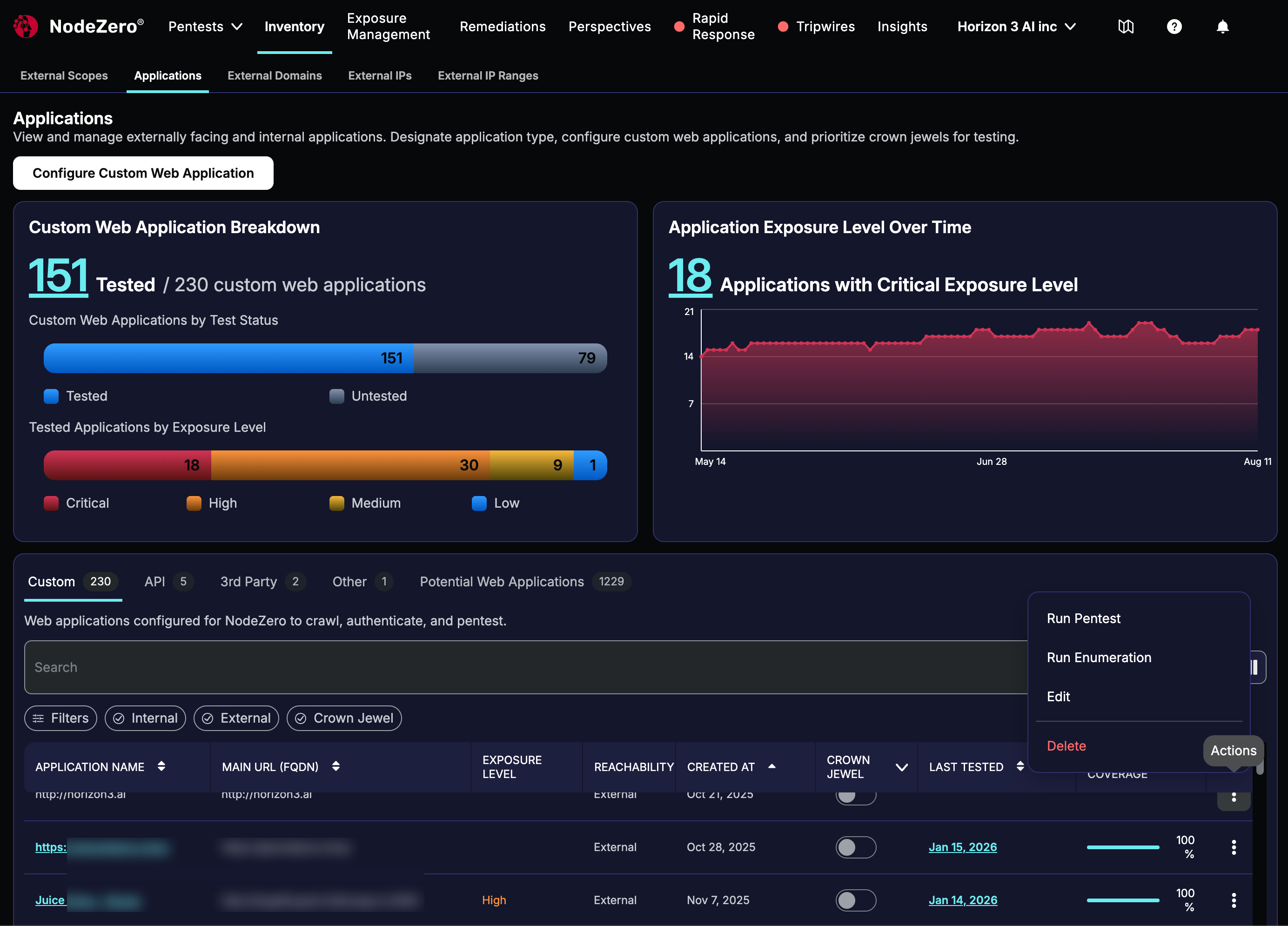
Define your application: Start at Inventory > Applications > Configure Custom Web Application (the large upper-left button in the screenshot below). Supply your application's base URL, testing environment (production-safe versus dev/staging aggressive), optional endpoints specification (in Swagger/OpenAPI format), HTTP methods and rules allowed during the test, and credentials and roles to exercise.
-
Run an Enumeration test: Start at Pentests > + Pentest > WebApp. Select an external or internal enumeration, and then select the corresponding application you've defined. The results of this free, passive test help you evaluate NodeZero's coverage against your environment before you commit a license to an attack test.
-
Attack your app: Start at the same Pentests > + Pentest > WebApp tile, select an external or internal pentest, and select your application. (Or, as shown below: start at Inventory > Applications > Custom, open the Actions () menu to the right of your application, and select Run Pentest.)
-
Review test results: For insight into your application's vulnerabilities and remediation steps. For details, see Findings and Results.
Access to Testing and Results
Users with permission to run NodeZero pentests in a given organization can run a WebApp test, subject to applicable product and inventory controls. WebApp testing follows the same RBAC model used by the rest of NodeZero.
Secure Credential Handling
You enter application credentials during WebApp configuration, and inject them on a NodeZero Runner during test execution. A Runner is required to apply these credentials, and your credentials are not exposed during routine product usage.
External Sharing
WebApp results can be shared externally through exported PDF and CSV reports.
Configuring Applications and Tests
Configuring WebApp pentests spans two contexts:
-
Settings that you store on the Web Application object, which persist across runs.
-
Settings that you configure at pentest launch, which apply to a single run. (These settings currently do not support scheduling tests.)
We cover these phases separately on the next few pages, followed by topics about interpreting the WebApp test's behavior and results.